THE VERIFICATION LAYER FOR COMMERCECHECKED DAILY · OCTOBER 1, 2026
Product.ai/Research/AI automation is bad for business. That’s why I’m building my company around AI.
Essay · No. 15July 1, 2026
AI automation is bad for business. That’s why I’m building my company around AI.
The case for amplifying people with AI instead of automating them away, and a look inside the simple platform one bootstrapped company actually runs on.
I’m optimistic about AI. This probably doesn’t surprise you, because, as you can see from my byline, I’m the CEO of an AI company.
What you may not expect is that I believe most organizations are using AI the wrong way. They’re taking existing tasks and bolting AI onto them, or breaking down human jobs into collections of tasks and then assigning them to AI agents.
I call this task-first automation, and it can look like a call center adding a chatbot that customers have to navigate before talking to a person, or replacing call center staff with AI agents that only answer a small subset of customer questions.
This kind of automation leads to failure because it treats your existing workflow as immutable and changes only how each step gets done. And many businesses will make each individual step cheaper and faster without looking at the work as a whole.
I believe a better way is to start with your mission and then imagine how you could achieve it with AI. For example, let’s say your product team’s mission is to decide what to build. They could do this by using AI to code live prototypes instead of writing lengthy specs and documents that stakeholders must review. (Task-first automation would have them generating documents faster.)
The end result of this approach is often processes that better achieve our mission, as well as new, valuable work for my team. This is why I’m building my company around AI.
For us, this means developing our own AI-enabled collaboration platform and continually testing it. And, if you’re thinking about doing this yourself, you’ll be glad to know it’s not a costly, maintenance-intensive new system. Instead, it runs on three tools many of you already use every day.
Overview
I’m the sole owner of Product.ai. I bootstrapped it, we’re profitable, and I don’t answer to investors.
This gave me a unique opportunity to see what our team could accomplish with AI without adopting the strategy that the market rewards most right now, which is “invest in AI to cut jobs.”
And, for the record, we’re not anti-automation at all. We use AI agents all the time and run them 24/7 to work on goals the team sets.
The Automation Trap
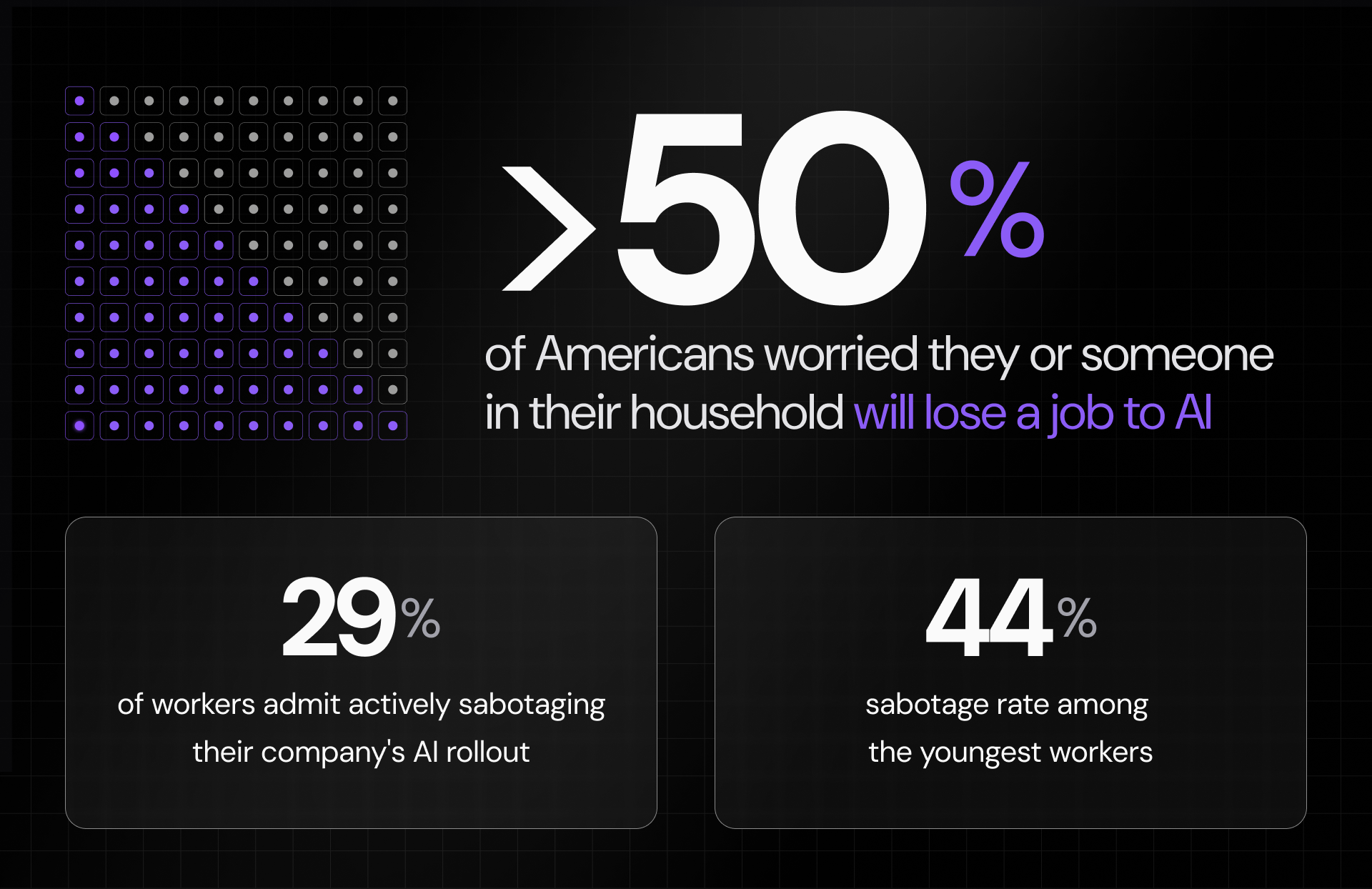
It’s simple. Most people today are afraid that AI will take their jobs. More than half of Americans told a recent poll they’re worried they or someone in their household will lose a job to AI.1
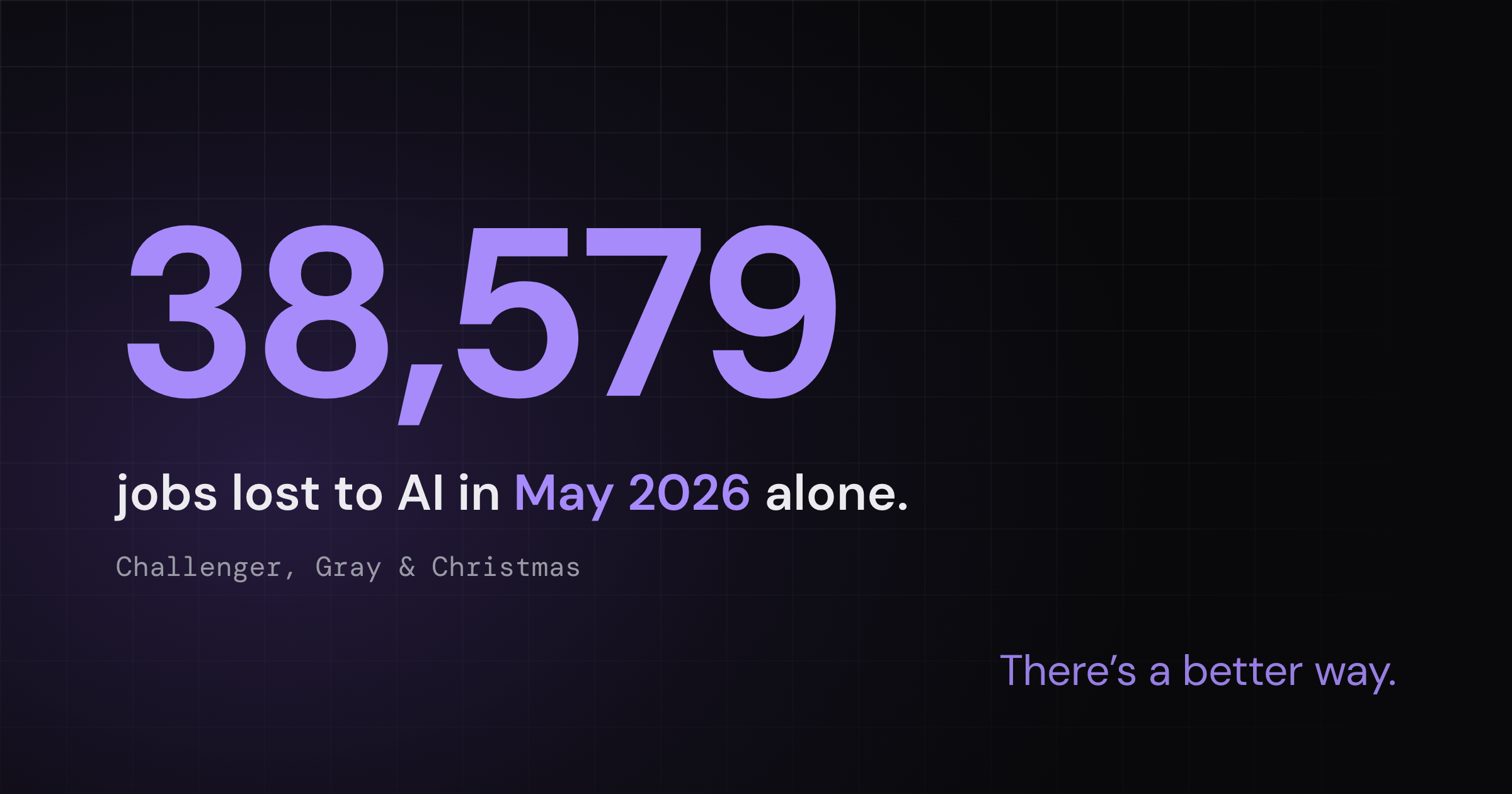
And, with the constant drumbeat of layoff announcements blamed on AI, it’s a reasonable fear. In May 2026, AI led all reasons for job cuts for the third month in a row, with 38,579 announced cuts.2
Some people are taking things even further. In a 2026 survey of 2,400 workers, 29% admitted they were actively sabotaging their company’s AI rollout, and among the youngest workers it climbed to 44%.3
I believe the automate-and-cut worldview is responsible for this resistance, because it puts employers and workers on different teams with different goals. Of course, people aren’t eager to train the technology that will ultimately replace them.
Stop asking what you can automate. Ask what you’re actually trying to do.
The fear is widespread, and some workers are already acting on it.
Task-first AI automation doesn’t work very well
The strange thing about today’s rush to replace people with automation is that it’s not delivering major productivity gains.
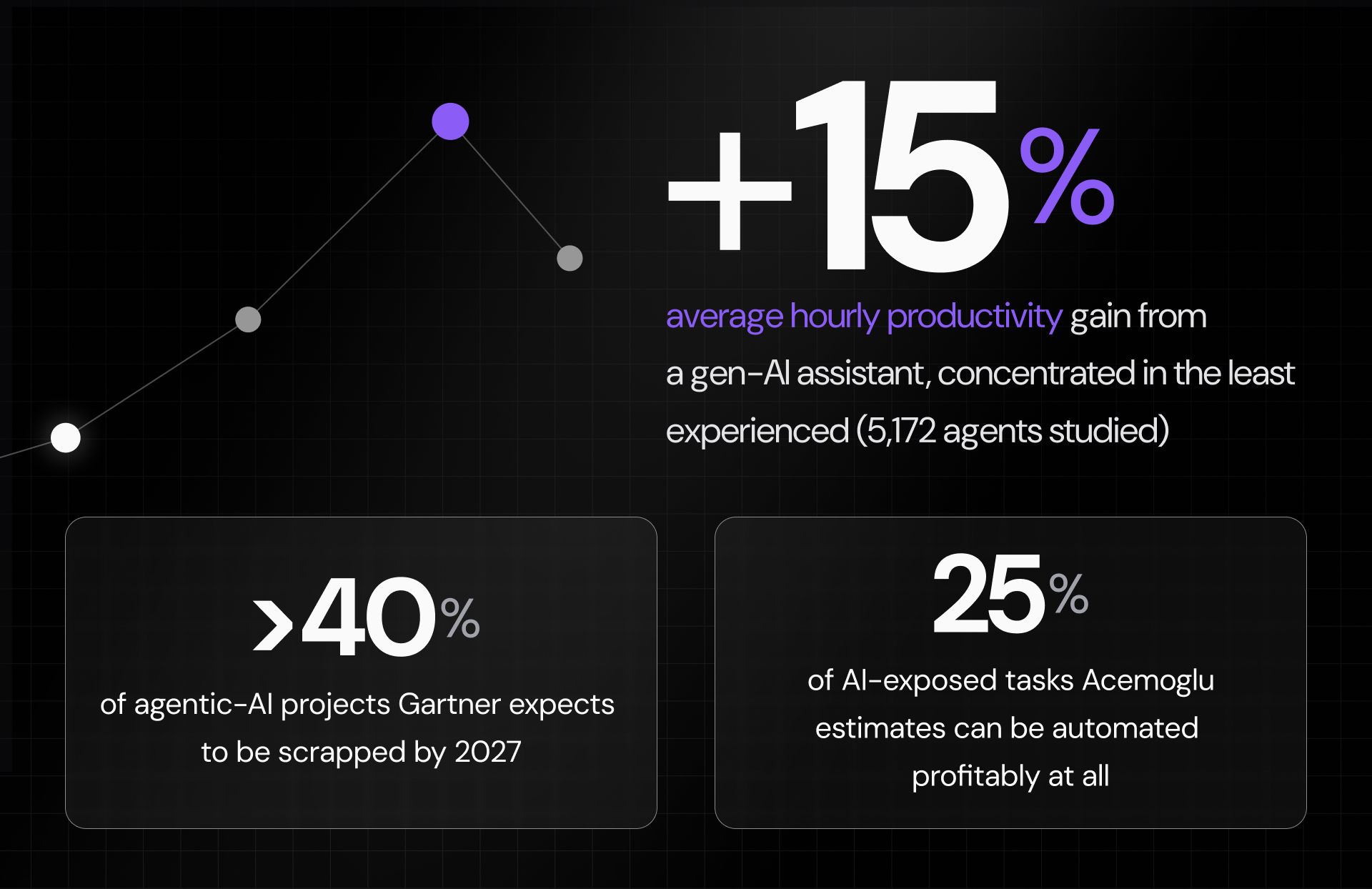
A study of 5,172 customer-support agents using a generative AI assistant found an average gain of about 15% an hour, and most of that went to the least experienced workers while the strongest performers barely moved.4
And these modest gains are not enough to compensate for large-scale layoffs.
The classic example of this happened in early 2024, when Klarna replaced most of its customer-service team with AI. By May 2025 it was hiring people again, with its CEO conceding that over-prioritizing cost had produced ‘lower quality’ service customers didn’t want.5
Klarna is not an isolated example.
In 2026, Gartner found that AI-driven layoffs didn’t deliver return on investment (ROI). Layoff rates were nearly identical at firms reporting high returns and those reporting little or none.6 So the companies choosing layoffs are effectively trading long-term capabilities for short-term market gains.
The gains are modest and uneven, and most automation projects don’t last.
The Amplification Thesis
If reorganizing around a technology instead of using it to cut headcount sounds like wishful thinking, I suggest taking a closer look at recent history.
In the early 1960s, when the computer was the new thing that was going to take everyone’s jobs, Licklider and Engelbart argued its real value would be to amplify what people could do, not to do it for them.7
Licklider was a psychologist who would go on to steer the government research behind the internet, and Engelbart was the engineer who invented the computer mouse. Today, sixty years later, it’s clear that they were right.
Work looks nothing like it did in the 1960s. Whole office jobs are gone, like the stenographer, the typing pool, the switchboard operator, and the clerk who added figures by hand.
But new kinds of work took their place, from software developers to UX designers to data analysts. These careers all require directing machines instead of being replaced by them.
I think AI will take this path, too.
Its real value would be to amplify what people could do, not to do it for them.
What happens if you amplify instead of cut
At my company, I decided to use AI to amplify how people work instead of automating individual tasks and jobs.
Over the past year, we built an AI-native team, and we’re all doing new jobs now. And we’re all still here, working on the same problems, but making more progress.
How did we get to this place?
We did not look at tasks and jobs and think about how they could be sped up or eliminated. Instead, we reimagined our organization from the ground up and thought about how we could structure our systems and processes around what AI and people can do best.
This led us to build a connected, AI-powered collaboration platform that captures everyone’s ideas and work and makes a real-time snapshot of our collective knowledge easily accessible.
Building the Platform
When initially designing the collaboration platform, I had three main requirements.
First, it had to run on top of tools we already used. My goal was not to build a new system that would eat up our developers’ time and pull us away from our actual product.
Second, it had to work as well for our non-technical people as for our engineers. A software developer and a public relations lead both had to be able to use it for their own kind of work.
Third, it had to encompass all the collective knowledge in our organization in a way that would not build a culture of surveillance or require us to continually store and sync a flood of half-baked drafts and experimental deliverables.
The surprisingly simple platform architecture
I built the platform around three tools that many teams already have:
1. GitHub, a version-control system made for code. It can store and track any information that can be written as text.
2. Claude Code, an AI agent designed to write software. In practice, it can work on almost any project made of information or content.
3. Claude Cowork, an agentic tool for the people on our team who don’t write code.
Is there a database?
The short answer is no, at least not the kind most software runs on. Our knowledge isn’t stored in a database that you query with SQL, with tables and joins to maintain. It’s written as plain, markdown-formatted text in GitHub repositories, where both people and AI agents can read it directly.
Our GitHub repos include current information on every aspect of our operations, including our people, recruiting activities, product development and testing, research, marketing, content, and more. And while not everyone can access everything, it gives our team an easy and convenient way to know what’s happening in their domain and in the company overall.
We do build a search index on top of that text so the AI can find things quickly across thousands of documents. The index itself runs on SQLite, which is a small, standard database stored as a single file, but it isn’t where our knowledge is kept. The index is disposable, which means it’s generated from the text and can be rebuilt whenever we need it. This keeps the text files as the single source of truth and the index as a convenience.
At a high level, this gives our people and our agents the context they need to operate, in one form both can read.
Separating public and private spaces
Not every piece of work is ready to share. People need somewhere to think out loud, test rough ideas, and store early drafts before any of it goes to the team.
So I designed the platform with two privacy zones. The first is a public space, where published work is available to everyone who needs it.
The second is a private workspace where each person keeps their own files, notes, and goals. Nothing moves from a private workspace into the shared space on its own. It’s published only when the person decides to publish it.
Governance
The rules for the platform are all written in plain markdown, in the same repositories as everything else, so any team member or AI agent can read them directly. The governance documents cover how the platform should be used, who can see which information, and where the line between public and private is drawn.
The technical details
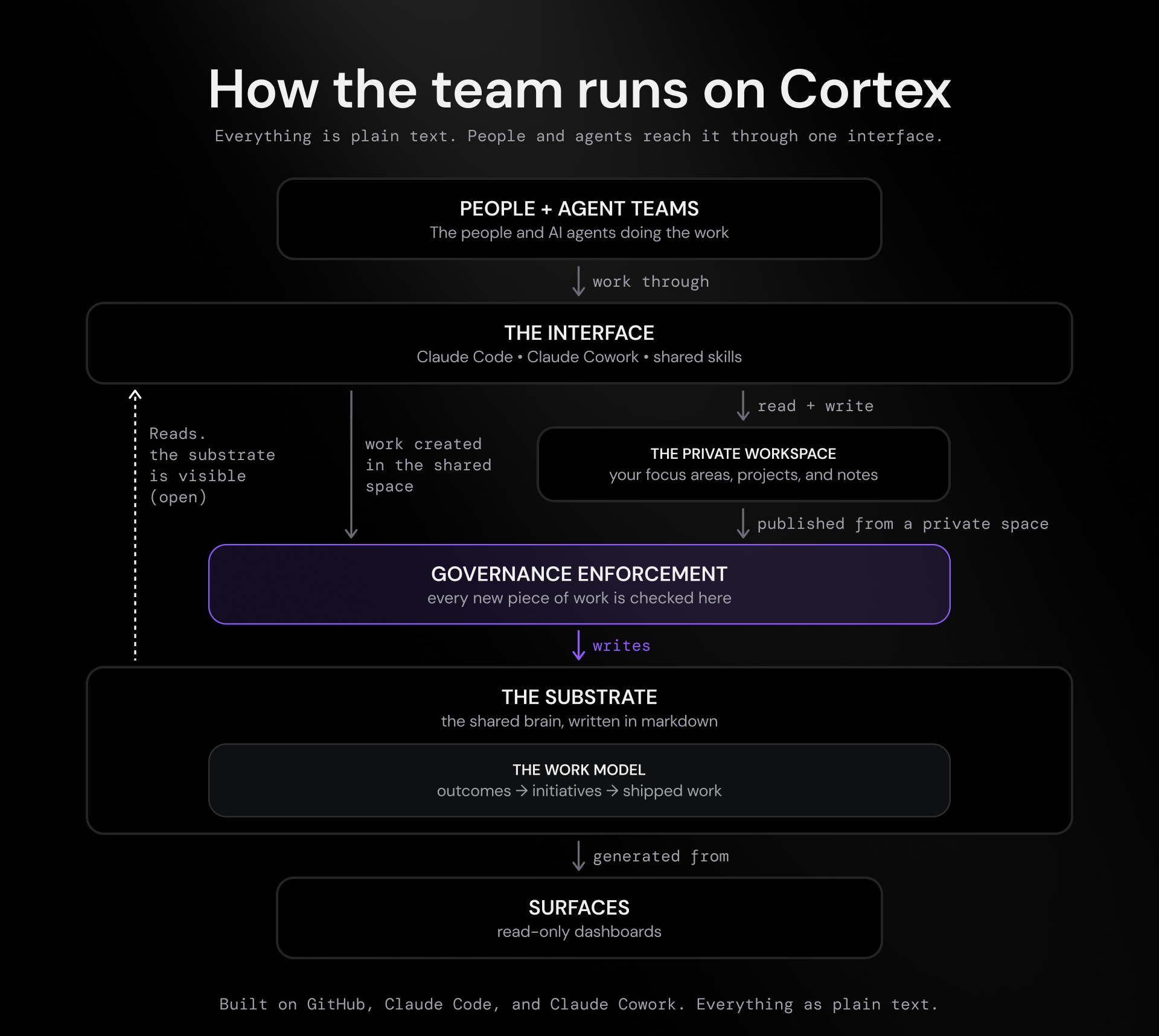
Internally, we call the platform Cortex, because it functions as our shared brain. We think of it as six parts that work together:
1. The substrate: This is the body of markdown files in our repositories that include our goals, strategy, people, operations, shipped work, project details, and governance documents. It’s the company’s memory, written as text.
2. Governance enforcement: We built custom software that checks each new piece of work against our operating rules and flags anything that breaks one. These are the rules for how the company runs, and they cover where each kind of information belongs, what stays private and what gets shared, and how a piece of work connects to the goal it serves.
3. The work model: This is how we define our goals and track our progress. For every project, we document outcomes detailing what success looks like, and we track progress against them as GitHub Issues. Finished work becomes a shipped-work record, and each person decides what to record as shipped and when. We evaluate performance based on how effectively shipped work achieves outcomes, not how busy someone looks or how much AI they used.
4. The interface: This is how people interact with the platform day to day. For most of us, that’s Claude Code or Claude Cowork, plus a shared library of skills. A skill is a named command that documents the steps and context for a particular job, from building a prototype to drawing a branded diagram. The shared skills are available to everyone, and people can also keep their own private skills in their personal settings.
5. The private workspace: This is the personal workspace I described earlier, where each person keeps their active areas of focus, their projects, and their working notes. It also has a step we call memorializing. At the end of a work session you save its context, so the next day the AI picks up where you left off instead of starting cold.
6. Surfaces: These are the dashboards, generated from the markdown. They show your outcomes, your progress in each area of focus, and the latest product updates at a glance. A surface is only ever a view of what’s already in the text. It’s generated from the substrate and from people’s private workspaces, and it’s never a source of truth of its own.
People and agents work through one interface. They read the substrate directly, and any new work, whether created in the shared space or published from a private workspace, passes through governance before it joins the substrate. Surfaces are read-only views generated from it.
How employees interact with the platform
Our people work with the platform in different ways, depending on what they do and how they like to work.
Engineers tend to work in Claude Code, in the terminal where they can easily access and run code files. People in non-technical roles like marketing or recruiting more often work in Claude Cowork, which behaves more like a traditional chatbot than a command line. Either way, they’re working with the same shared brain and the same library of skills.
In practice, this means someone in public relations can ask the platform about the product roadmap and get an accurate, helpful answer, and an engineer can ask it to draft a customer note, and neither has to learn the other’s tools to do it.
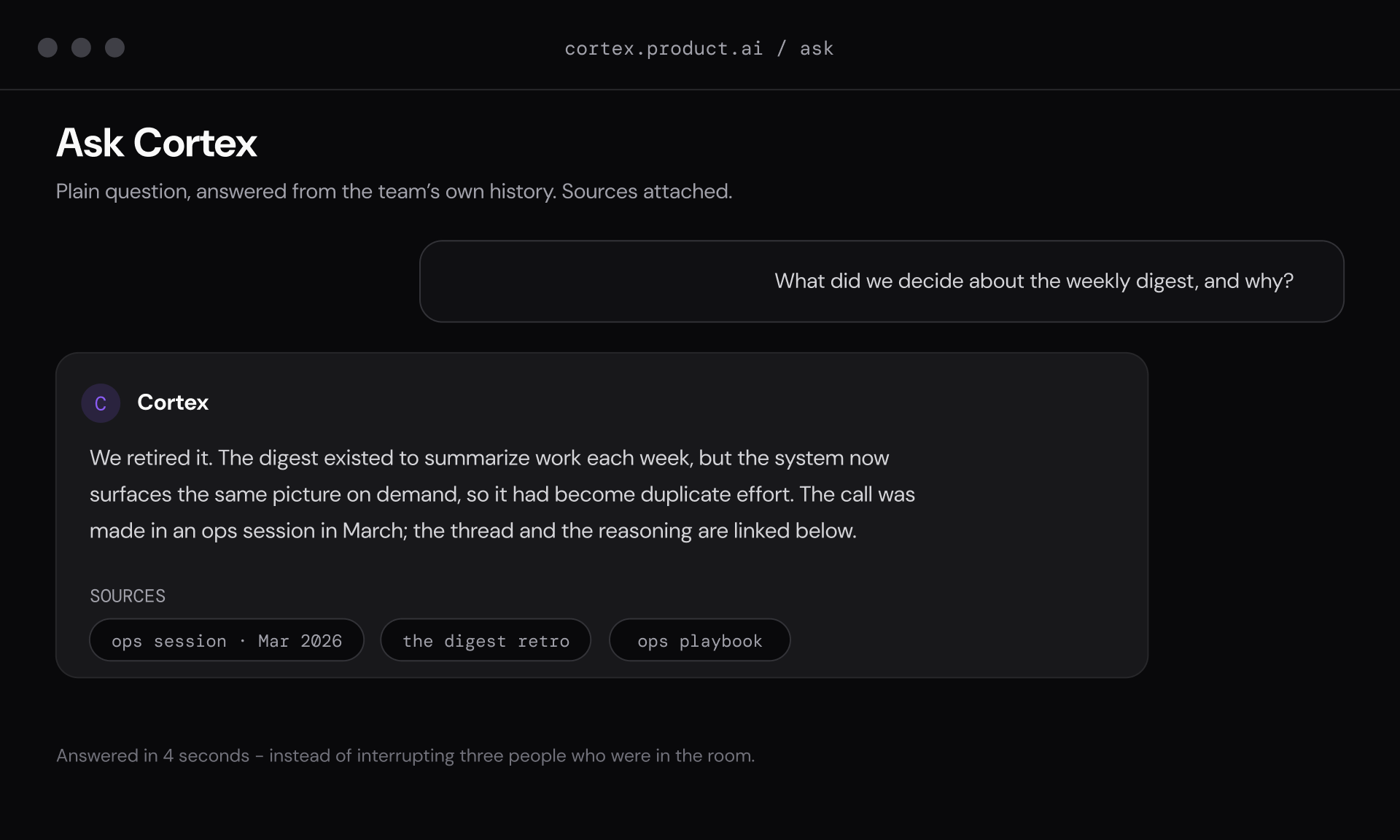
Anyone can ask the platform a question in plain language and get an answer drawn from the team’s own history, with the sources attached.
How Work Actually Changed
We shifted from a conventional operating model involving lots of Slack, email, and meetings (both virtual and in person) to working almost entirely through the platform. Now everyone has access to advanced AI models, and our daily work looks very different. Some examples include:
No more status meetings
We used to hold weekly meetings so everyone could share an update, and I could get a better idea of what everyone was working on. It was a hassle, but necessary for smooth operation.
With our new AI-enabled work model, these meetings disappeared. Now people share their working sessions with the collaboration platform and AI has access to all of this context.
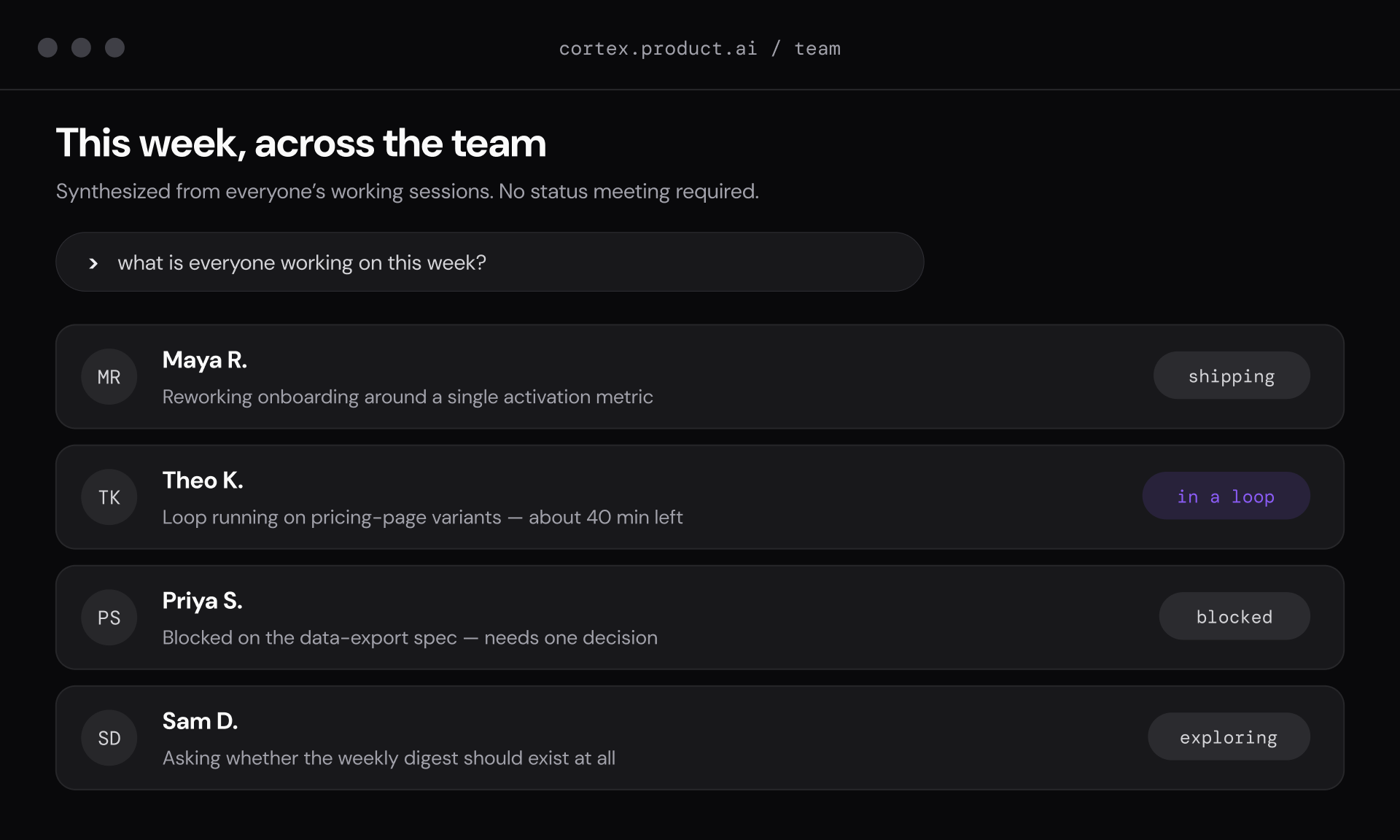
So, when I need to know what someone’s working on, I just ask AI instead of interrupting them to ask for a report.
The report a weekly status meeting used to produce, assembled from everyone’s working sessions and available whenever I want it.
Prototype-first development
How we built products also changed dramatically. We used to produce written documents and specs, which all had to be approved by multiple stakeholders before development could begin. This process could add days or weeks to every new release.
Now we start by building a rough prototype that stakeholders can see and interact with. We can quickly review multiple prototypes by simply talking out loud in a session that our platform records.
Most ideas die in their first hour of life, quickly and cheaply, without anyone spending hours on writing or reading documentation.
Mini-CEOs with agent teams
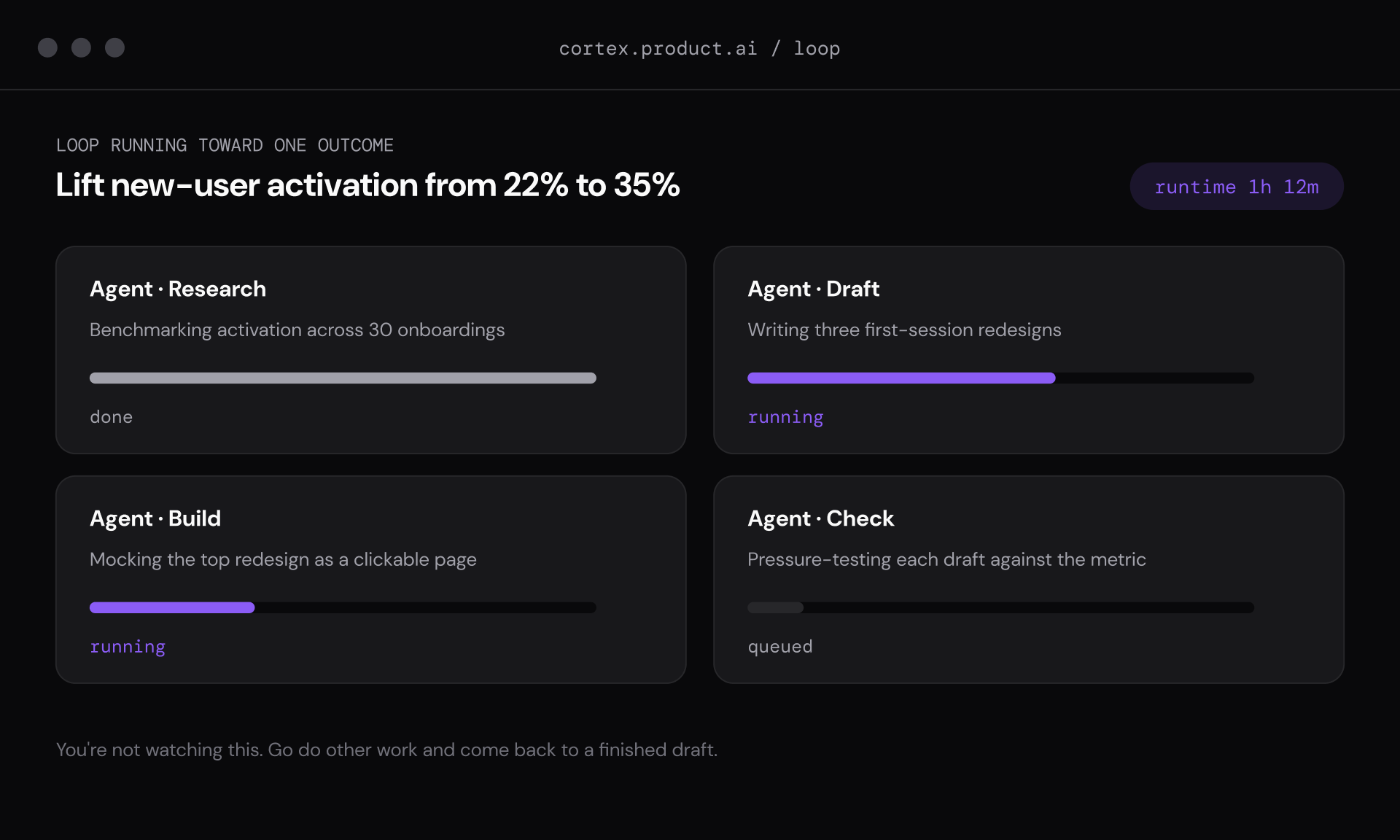
We’re also beginning to give teams of AI agents tasks that they keep working on until they reach the goals we define.
In this case, the human team member’s role is to define outcomes for the agent team, evaluate what it produces, and redirect it in constructive ways.
Because agents can work independently for hours, we can easily supervise one or more agent teams and still have time to do the human aspects of our jobs, like meeting with colleagues and customers.
A team of agents working toward a single outcome the person defined. You set the goal, hand it off, and come back to judge the result.
What a “normal day” at our company looks like
There’s no single normal day, but a few things are true of most of them.
I usually start by catching up on what the team and our agents accomplished while I was away. Our agents run around the clock, so a lot happens overnight. Perhaps a research task finishes, a draft gets further along, or a prototype gets built. Instead of calling a status meeting and interrupting several people to find out, I read a short summary the platform puts together. Or I just ask it what changed and who’s working on what.
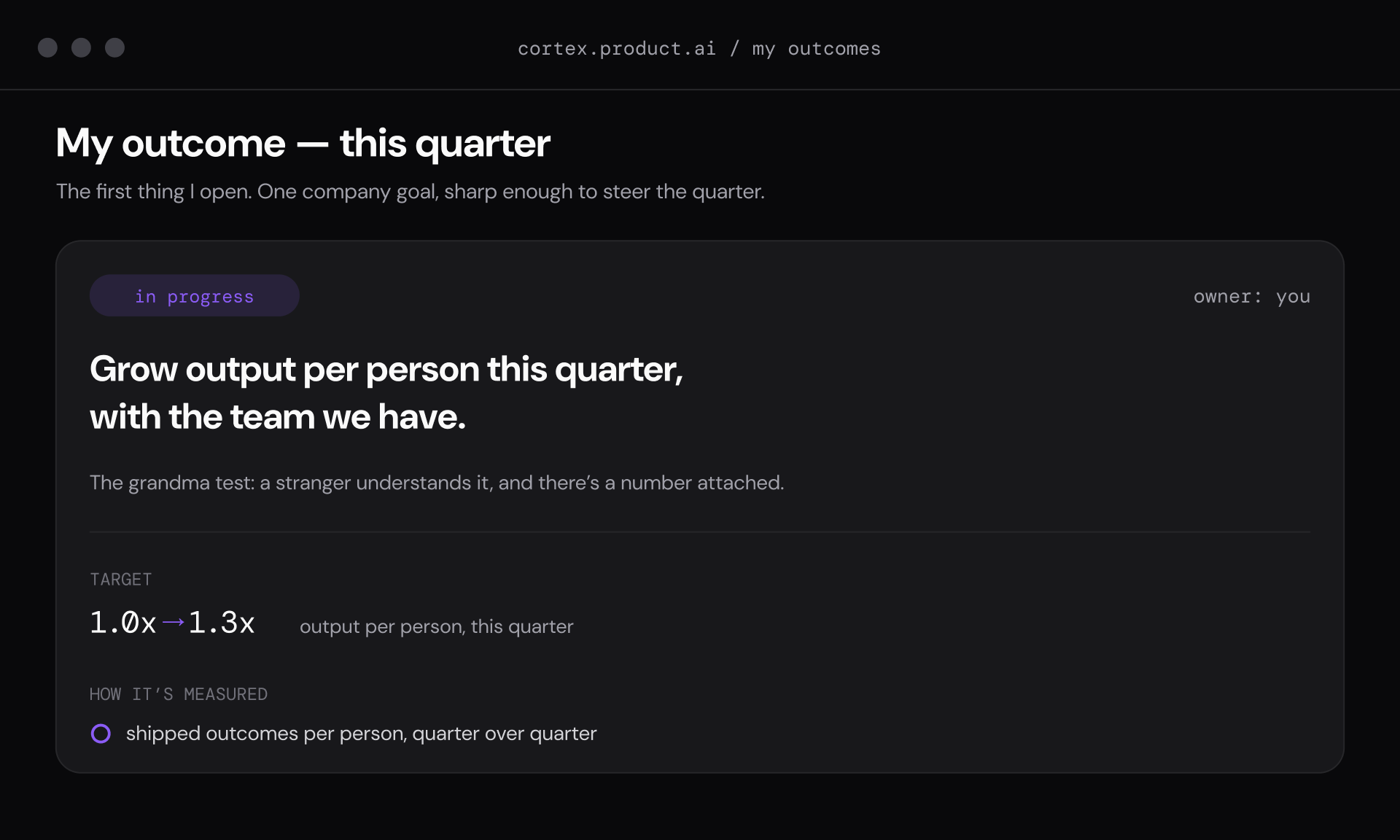
My own outcome is the first thing I open each day. It’s one company goal for the quarter, plain enough that a stranger could understand it and tied to a number.
From there, most of my day splits between two kinds of work. Some of it is hands-on. For example, I might sit in a session, talk an idea through out loud, build a rough prototype, and attack a decision from a few angles before I commit to it. The rest is supervising. I define an outcome for a team of agents, hand it off, and come back later to judge what they produced and steer them somewhere better.
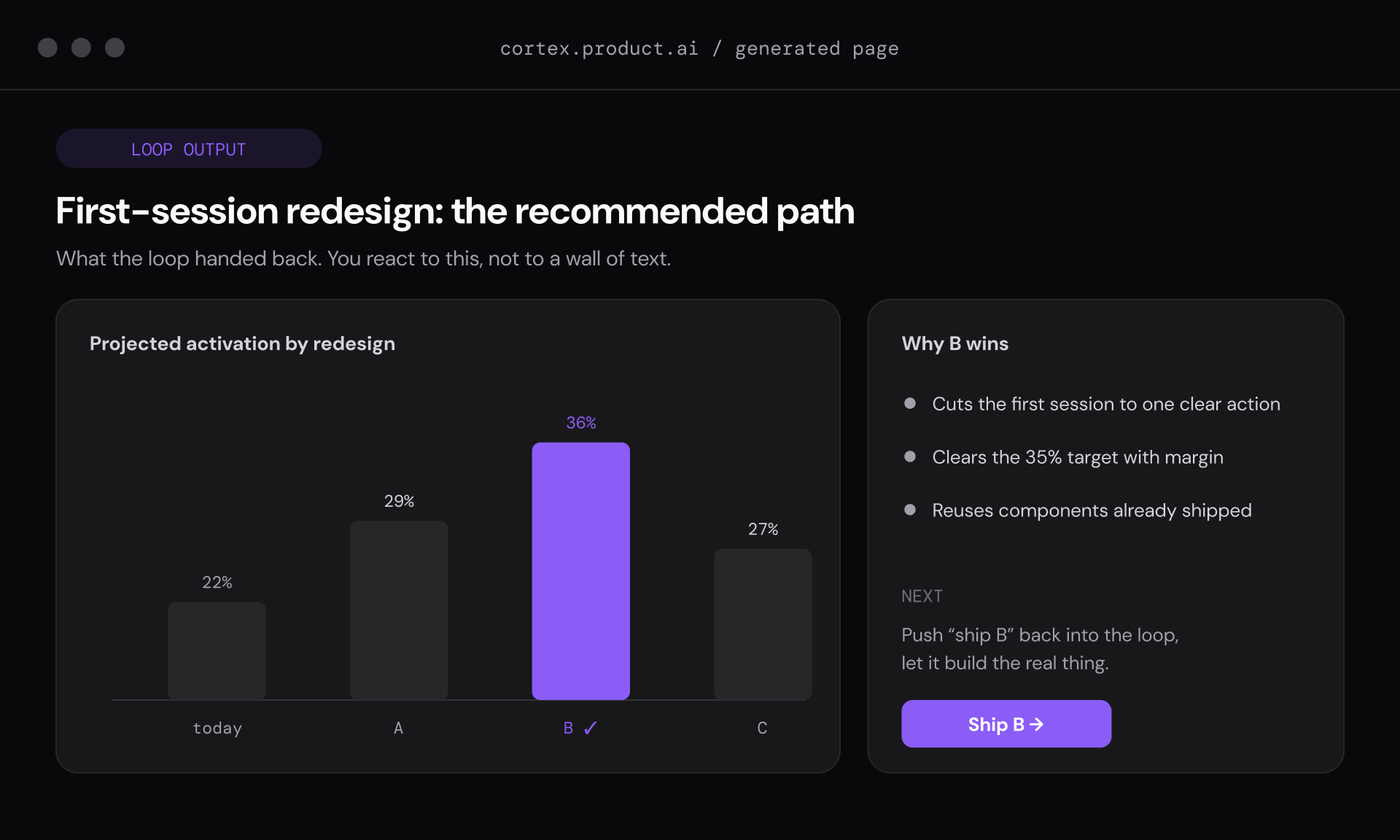
When an agent team finishes, I react to what it hands back. It gives me a recommendation and a clear next step instead of a wall of text.
At the end of the day, the work doesn’t vanish into someone’s head or an unsearchable chat log. People save their sessions to the shared brain, so tomorrow the context is there for anyone, person or agent, who needs it.
We’re all still here, working on the same problems, but making more progress.
The Risk and the Playbook
In my experience, the biggest risk of AI-native work is comfort work.
We define comfort work as work that feels productive, but doesn’t actually advance our organizational goals. And, because AI can produce multiple iterations of everything so fast, it can be tempting to over-polish everything.
Examples include refactoring code that already works fine, creating ten variants of a landing page that isn’t approved yet, documenting features that nobody is using, and building a deck for every meeting.
All of this activity can make you look and feel busy, but it takes your company further away from its goals. And nobody’s immune. When facing a big decision, I used to commission a thorough written plan like a deck or a phased roadmap to show myself and the team I was taking it seriously. With AI, I can generate multiple options, simulate them, and attack them adversarially in an afternoon and end up with a better decision.
I also think the proliferation of comfort work is why so many AI projects are failing. Gartner expects more than 40% of agentic-AI projects to be scrapped by 2027.8
Tips for building your own AI collaboration platform
If you’re considering this path, this is what I’d recommend.
Build on tools you already have. We didn’t write an AI collaboration platform from scratch. We assembled it from tools our team and plenty of others were already using. The less custom software you have to maintain, the more time you spend on the product you sell.
Make it work for non-engineers from day one. If only your technical people can use the system, a significant percentage of your company can’t. Choose interfaces a recruiter or a writer can use as comfortably as a developer.
Keep your knowledge as plain text. Text is searchable, permanent, and readable by both people and AI. It also doesn’t trap what you know inside a custom product or a database you’ll have to migrate out of someday.
Reward outcomes, not AI usage. The goal should be progress toward your mission, not token consumption for its own sake.
Start from your mission. Before you automate anything, make sure you’re clear on what you’re trying to achieve, then design the work backward from there.
Choose to amplify, not automate
Some very smart pessimists think AI will inevitably be implemented in ways that are bad for individuals and their employers.
Daron Acemoglu, the MIT economist and 2024 Nobel laureate, has spent years showing that most automation is mediocre, displacing people without producing much. He estimates only about a quarter of AI-exposed tasks can be automated profitably at all.910
But most of today’s studies are looking at automation from the bottom up, which automates tasks piecemeal instead of looking at the organization and its mission from the top down.
I think the pessimists are wrong on this one, underestimating both human creativity and the potential of AI, in the right hands, to open new worlds of opportunity.
If this sounds attractive to you, I encourage you to try it at your own organization. Get a blank piece of paper. Pretend you’re starting your business today and redesign it around AI capabilities and what you know your people can do.
Then enlist your team and explain that you’re interested in reimagining the business, not cutting jobs (especially if this is true). And reward them for outcomes, not simply using AI (e.g., tokenmaxxing11).
We’ve been operating this way at my company for the past year, and I’d choose it again. Stop asking what you can automate. Ask what you’re actually trying to do, and what is now possible with AI.
p.s., If you’re working on this too, send me a note. I’d like to hear what you’re doing.
Erik Brynjolfsson, Danielle Li, and Lindsey Raymond, “Generative AI at Work,” Quarterly Journal of Economics 140, no. 2 (May 2025): 889–942, academic.oup.com/qje/article/140/2/889/7990658.
@misc{quoc-amplify-dont-2026,
  title    = {AI automation is bad for business. That’s why I’m building my company around AI.},
  author   = {Quoc, Michael},
  note     = {Personal essay published by Product.ai Research},
  howpublished = {\url{https://product.ai/research/amplify-dont-automate/}},
  year     = {2026},
  month    = {07}
}
APA
Quoc, M. (2026, July 1). AI automation is bad for business. That’s why I’m building my company around AI. [Essay]. Product.ai Research. https://product.ai/research/amplify-dont-automate/
MLA
Quoc, Michael. "AI automation is bad for business. That’s why I’m building my company around AI." Product.ai Research, 1 July 2026, product.ai/research/amplify-dont-automate/.
M
Michael Quoc
Founder & CEO
Founded Product.ai (formerly Demand.io) in 2009 with a conviction that commerce data should be verified, not assumed. Built SimplyCodes into the leading coupon verification platform in the US, bootstrapped, profitable, and competing against billion-dollar acquisitions. Leads the company’s AI strategy, its patent-pending verification method, and the transition from coupon verification to full-spectrum commerce intelligence. Maintains 100% ownership because sovereignty and truth both require no conflicts of interest.
{
  "@context": "https://schema.org",
  "@graph": [
    {
      "@id": "https://product.ai/#organization"
    },
    {
      "@type": "SoftwareApplication",
      "@id": "https://product.ai/#application",
      "name": "Product.ai",
      "slogan": "Intelligent guidance at conversation speed",
      "description": "Product.ai is your AI shopping expert - verified product intelligence grounded in the Truth Graph, accessible to agents and humans alike.",
      "applicationCategory": "ShoppingApplication",
      "operatingSystem": "Web",
      "author": {
        "@id": "https://product.ai/#organization"
      },
      "offers": {
        "@type": "Offer",
        "price": "0",
        "priceCurrency": "USD"
      }
    },
    {
      "@type": "ScholarlyArticle",
      "@id": "https://product.ai/research/amplify-dont-automate/",
      "headline": "AI automation is bad for business. That’s why I’m building my company around AI.",
      "description": "AI layoffs are at record highs but don’t improve ROI. Product.ai founder Michael Quoc on running his company on AI without cutting jobs.",
      "url": "https://product.ai/research/amplify-dont-automate/",
      "author": [
        {
          "@type": "Person",
          "name": "Michael Quoc",
          "sameAs": [
            "https://linkedin.com/in/michaelquoc",
            "https://x.com/michaelquoc",
            "https://michaelquoc.com"
          ]
        }
      ],
      "datePublished": "2026-07-01",
      "dateModified": "2026-07-01",
      "citation": [
        {
          "@type": "CreativeWork",
          "name": "BibTeX",
          "text": "@misc{quoc-amplify-dont-2026,\n  title    = {AI automation is bad for business. That’s why I’m building my company around AI.},\n  author   = {Quoc, Michael},\n  note     = {Personal essay published by Product.ai Research},\n  howpublished = {\\url{https://product.ai/research/amplify-dont-automate/}},\n  year     = {2026},\n  month    = {07}\n}"
        },
        {
          "@type": "CreativeWork",
          "name": "APA",
          "text": "Quoc, M. (2026, July 1). AI automation is bad for business. That’s why I’m building my company around AI. [Essay]. Product.ai Research. https://product.ai/research/amplify-dont-automate/"
        },
        {
          "@type": "CreativeWork",
          "name": "MLA",
          "text": "Quoc, Michael. \"AI automation is bad for business. That’s why I’m building my company around AI.\" Product.ai Research, 1 July 2026, product.ai/research/amplify-dont-automate/."
        }
      ],
      "publisher": {
        "@id": "https://product.ai/#organization"
      },
      "mainEntityOfPage": {
        "@id": "https://product.ai/research/amplify-dont-automate/"
      },
      "inLanguage": "en-US",
      "isPartOf": {
        "@type": "CollectionPage",
        "@id": "https://product.ai/research/",
        "name": "Product.ai Research",
        "url": "https://product.ai/research/"
      }
    },
    {
      "@type": "BreadcrumbList",
      "itemListElement": [
        {
          "@type": "ListItem",
          "position": 1,
          "name": "Product.ai",
          "item": "https://product.ai"
        },
        {
          "@type": "ListItem",
          "position": 2,
          "name": "AI automation is bad for business. That’s why I’m building my company around AI.",
          "item": "https://product.ai/research/amplify-dont-automate/"
        }
      ]
    }
  ]
}